How To Create Your Own Custom Pokemon Sticker Collection
TLDR
- Start with a clear theme: region, type, favorite team, shiny variants, gym badges, starters, legendaries or a full Pokédex-style set.
- Make original artwork instead of copying official Pokémon images, logos or card scans.
- Use sticker sheets for collectible sets, die cut stickers for standout designs and waterproof vinyl for laptops, bottles, cases and tech.
- Print at home for testing, use a Cricut or Silhouette for cleaner DIY cuts or order from a professional printer when you want better durability.
- Store your collection in a reusable sticker book, binder, card sleeves or themed pages so it feels like a real collection.
A custom Pokemon sticker collection is a lot more fun when it feels like a set, not just a folder of random Pikachu images you printed at midnight because inspiration got out of hand. The best collections have a theme, a consistent art style and a plan for where the stickers will actually live.
The nice part is that you do not need to be a professional illustrator to make one. You can sketch in Procreate, build simple designs in Canva, clean up art in GIMP or Inkscape or combine hand-drawn art with digital layouts. The key is to make your custom Pokemon sticker collection feel personal while being careful about Pokémon’s protected characters, names, designs and logos.
Start With A Collection Theme
Before you design anything, choose the collection idea. This is the step people skip, and it is usually why the final sticker sheet feels messy.
A theme gives your collection a reason to exist. It also makes the design work easier because every sticker has a job. You are not just asking, “What should I draw?” You are asking, “What belongs in this set?”
Here are a few easy collection themes:
- Starter Evolution Set: Bulbasaur, Charmander, Squirtle and their evolution lines.
- Favorite Team Set: six Pokémon you would actually use in a game.
- Type Collection: Fire, Water, Grass, Psychic, Ghost, Dragon or whatever type you like most.
- Regional Pokédex Set: Kanto, Johto, Hoenn, Sinnoh, Unova, Kalos, Alola, Galar or Paldea.
- Shiny Chase Set: alternate-color versions with a “rare pull” feel.
- Gym Badge Set: badge-inspired icons, trainer items and type symbols.
- Tech Sticker Set: laptop, phone, tablet, water bottle and gaming case stickers.
- Mini TCG-Inspired Set: card-style sticker portraits, energy icons and little stat labels.
My favorite approach is the “team of six” method. Pick six Pokémon, design one sticker for each, then add a title sticker, a badge sticker and one tiny bonus sticker. That gives you a clean 8-sticker sheet without turning the project into a 1,000-piece Pokédex commitment.
And yes, the full Pokédex idea sounds cool. It also becomes a spreadsheet with monsters. Start smaller unless you really want the long grind.
Design Original Pokémon-Inspired Stickers
There are three main ways to design your stickers: draw them, build them from templates or create a hybrid style.
Drawing them gives you the most personality. Procreate is great for iPad users because it feels natural for sketching, coloring and adding outlines. A simple sticker style works well: thick outer border, clean shapes, bright color, simple shadows and a transparent background.
Canva is better if you want speed. It works well for text labels, badge-style designs, sticker sheet backgrounds and simple decorative elements. It is less ideal for detailed character illustration, but it is excellent for laying out a collection page.
GIMP and Inkscape are good free desktop options. GIMP helps with raster image editing, background cleanup and transparent PNG exports. Inkscape helps with vector shapes, clean outlines and SVG files. If you are making icons, badges or clean graphic shapes, Inkscape is especially useful.
You can also use AI tools for rough ideas, but be careful. Do not ask an AI tool to copy official Pokémon art or generate something that looks like official product art. A safer use is concepting your own monster-inspired creatures, sticker borders, backgrounds, elemental icons or layout ideas.
For a custom Pokemon sticker collection, I would use this simple art recipe:
- Pick one subject per sticker.
- Use a clean pose or object shape.
- Add a thick white or colored border.
- Keep tiny details limited.
- Use a transparent background.
- Export each design as a high-resolution PNG.
Small stickers punish small details. A tiny eye highlight, tiny type label or tiny stat number might look great on your screen and disappear completely once printed. If the sticker is under 2 inches wide, simplify the art.
Keep The Rights Issue Simple
Pokémon is protected intellectual property. That includes the characters, names, designs, logos and official artwork. For a personal art project, many fans draw Pokémon-inspired fan art and print it for themselves. But selling, promoting, publicly distributing or using official Pokémon imagery without permission can create real problems.
A practical rule: make original fan art for personal use, and do not sell it.
Avoid uploading official Pokémon card scans, official game art, screenshots, logos or product images to make stickers. If your goal is to make something for a shop, convention table, giveaway, brand promotion or paid product, do not use Pokémon IP unless you have permission.
This does not mean your collection has to be boring. You can still make a personal “favorite team” sheet, a type-inspired notebook set or a Pokédex-style organizing system using your own art. Just keep the project in the fan-made, personal-use lane.
Set Up Your Sticker Files Correctly
Good sticker printing starts with clean files. This is not the glamorous part, but it saves you from fuzzy edges, awkward cuts and designs that look smaller than expected.
For each sticker, use a transparent PNG if your artwork is raster-based. Aim for 300ppi at the final print size. If your sticker will be 3 inches wide, set it up at 3 inches wide at 300ppi. Larger is usually fine. Smaller can get blurry.
Use SVG, AI, EPS or PDF if your artwork is vector-based. Vector files work especially well for icons, badges, type symbols and clean logo-style art.
Leave space around the design. Most stickers look better with a border, especially character stickers and laptop decals. A white border is the classic choice, but colored borders can be fun if you are organizing by type. Fire stickers can have warm borders. Water stickers can use blues. Grass stickers can use greens. You get the idea.
For sticker sheets, leave enough room between each sticker so the cut lines do not crowd each other. A sheet with 8 to 12 medium stickers usually looks better than a sheet with 30 tiny ones. More is not always better. Sometimes it just means harder peeling.
A good setup checklist:
- Resolution: 300ppi at final print size.
- Background: transparent unless you want a printed sheet background.
- Border: add a clean outline around each sticker.
- Spacing: leave room between stickers on sheets.
- Text: keep small text large enough to read.
- File Names: use clear names like “kanto-fire-lizard-sticker.png” or “ghost-team-badge.svg.”
- Test Print: print on regular paper first to check size.
That last point matters. A regular paper test print will tell you very quickly if your stickers are too small, too crowded or too detailed.
Choose The Right Printing Method
There are three good ways to print a custom Pokemon sticker collection: home printing, DIY cutting machine or professional printing.
| Method | Best For | Tradeoff |
|---|---|---|
| Home printer and sticker paper | Testing ideas and small personal projects | Less durable and less consistent |
| Cricut or Silhouette | Cleaner DIY sticker sheets and custom cuts | Requires setup, calibration and materials |
| Professional sticker printing | Durable vinyl stickers, gifts and polished sets | Costs more than printing a test sheet at home |
Home printing is good for prototypes. Use printable vinyl or sticker paper made for your printer type. Inkjet printable vinyl is common, but always check the material instructions. A clear laminate sheet can add some protection, though hand-laminating can introduce bubbles or uneven edges.
A Cricut or Silhouette is the next step up. These machines let you print your sticker sheet, then cut around each sticker. This is great for kiss cut sticker sheets, where each sticker peels off a full backing sheet. It takes some setup, but it is satisfying once the registration marks and cut settings are working.
Professional printing is the best choice when you want the stickers to last. If your stickers are going on a laptop, water bottle, phone case, game console, car window or cooler, use waterproof vinyl. Paper stickers are fine for journals. They are not ideal for anything that gets handled, cleaned or taken outside.
For a polished set, I would use CustomStickers.com when you want durable vinyl stickers that look cleaner than a home print. Their custom stickers are a good fit for individual character-style designs, laptop decals, water bottle stickers and favorite-team stickers.
If you want the collection to feel like a real collectible release, use custom sticker sheets. Sticker sheets work especially well for Pokémon-style collections because you can group a full team, a type set, badges, mini icons or a regional theme on one sheet.
Use die cut stickers for your “main character” designs, like your favorite Pokémon-inspired artwork or team mascot. Use sticker sheets for groups, types, badges, mini icons and full themed sets.
Organize The Collection Like A Mini Pokédex
The organizing part is half the fun. A pile of loose stickers is fine, but a collection feels better when it has structure.
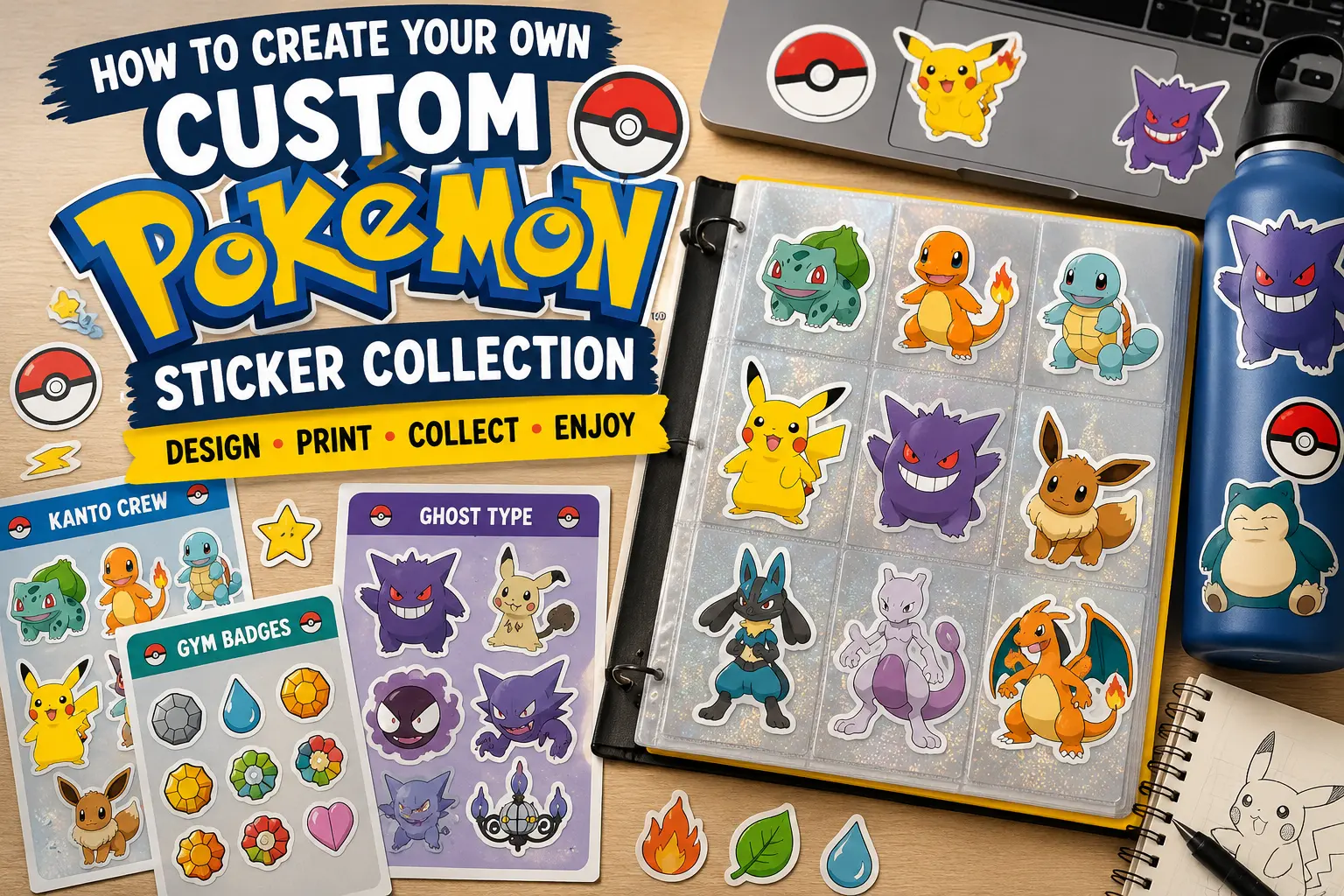
A reusable sticker book is the easiest option. These books usually have slick pages that let you place and remove stickers without destroying the adhesive. That makes them perfect for collectors who want to look through the stickers instead of using them all at once.
You can also use a binder. Put full sticker sheets in clear page protectors, or use card sleeves for smaller die cut stickers. This gives the whole thing a trading-card feel, which fits Pokémon nicely.
Try organizing your collection by:
- Generation: Kanto first, then Johto, Hoenn and so on.
- Type: Fire, Water, Grass, Electric, Psychic, Ghost, Dragon.
- Rarity: common, rare, shiny, legendary, promo.
- Team: your in-game teams, gym teams or themed battle squads.
- Use Case: laptop stickers, water bottle stickers, notebook stickers, binder stickers.
You can also create “rarity labels” for fun. Add tiny stars, holo-style borders or color-coded corners to your own designs. It makes the collection feel more like opening a booster pack, even though you are the one making the pack.
For a nice finishing touch, make a title sticker for each page. Examples:
- Kanto Favorites
- Shiny Pulls
- Ghost Type Crew
- Water Team
- Gym Badge Set
- Tech Sticker Loadout
- Legendary Shelf
This small detail makes the collection feel intentional.
Common Mistakes To Avoid
The biggest mistake is designing too many stickers before printing a test sheet. Print one page first. Check the size, colors, borders and readability. Then adjust.
The second mistake is using low-resolution art. A blurry PNG will not become sharp because it is printed on nicer material. Start with clean artwork.
The third mistake is making stickers too detailed. Stickers are small. Clean shapes and readable silhouettes usually work better than tiny linework.
The fourth mistake is ignoring the surface. A journal sticker and a water bottle sticker do not need the same material. For notebooks, planners and binders, paper or basic sticker paper may be fine. For laptops, bottles, tablets and outdoor use, waterproof vinyl is the better choice.
The fifth mistake is treating every sticker as equal. Collections are more fun when there are standouts. Make a few “hero” stickers larger. Make some smaller accent stickers. Add badges, sparkles, Poké Ball-inspired shapes or type icons around them.
That mix gives the sheet rhythm. It also makes the final result more useful.
Final Thoughts
A custom Pokemon sticker collection works best when it has a clear theme, original artwork and the right printing method for how you plan to use the stickers. Start with one small set before trying to build an entire Pokédex. A favorite team, a type collection or a regional mini sheet is more manageable and usually more fun.
Use Canva if you want easy layouts. Use Procreate if you want to draw. Use GIMP or Inkscape if you want free desktop tools. Print at home when you are testing. Use a cutting machine when you want DIY sticker sheets. Use a professional printer like CustomStickers.com when you want waterproof vinyl stickers that can handle laptops, bottles and everyday use.
And keep the Pokémon rights issue in mind. Make original fan art for personal use, avoid official images and do not sell Pokémon-based designs unless you have the proper rights.
Done well, your collection can feel like a tiny binder of memories: your favorite starters, your favorite team, your favorite region and maybe one shiny sticker that gets the best spot on the page. That is the part that makes it yours.